
Imagine your child sitting at their desk, staring at a blank Python console after years of dragging colourful Scratch blocks. The transition from visual logic to text-based syntax is often where young learners lose their spark, particularly when school resources are stretched thin. Finding high-quality online computer science for year 8 is no longer just an “extra” activity; it’s a vital step in ensuring they don’t fall behind as the UK curriculum evolves towards a broader, more rigorous “Computing” GCSE.
We know it’s worrying when a school lacks a specialist teacher or when the jump to formal coding feels too steep. You want your child to feel empowered by technology, not intimidated by it. This article provides a definitive checklist to help Year 8 students master core concepts, from the latest Python 3.14 updates to foundational AI literacy. We’ll walk through the essential skills needed for the new 2026 standards, giving you a clear roadmap to build their confidence and academic success. You’ll discover exactly what milestones to track, how to bridge the gap to Key Stage 4, and what to look for in a structured learning environment.
Key Takeaways
- Understand why Year 8 is the critical transition period from block-based coding to the formal logic required for GCSE success.
- Master the fundamental concepts of data representation and hardware processing that form the backbone of the modern UK computing curriculum.
- Identify the specific Python programming skills needed to navigate the shift from Scratch to text-based coding when choosing online computer science for year 8.
- Learn how to evaluate online learning platforms based on their academic rigour, flexibility, and alignment with Key Stage 3 standards.
- Discover how a structured roadmap and personalised support can build the confidence necessary for a seamless transition to Computer Science at GCSE level.
Why Year 8 is the Critical Bridge for Computer Science Success
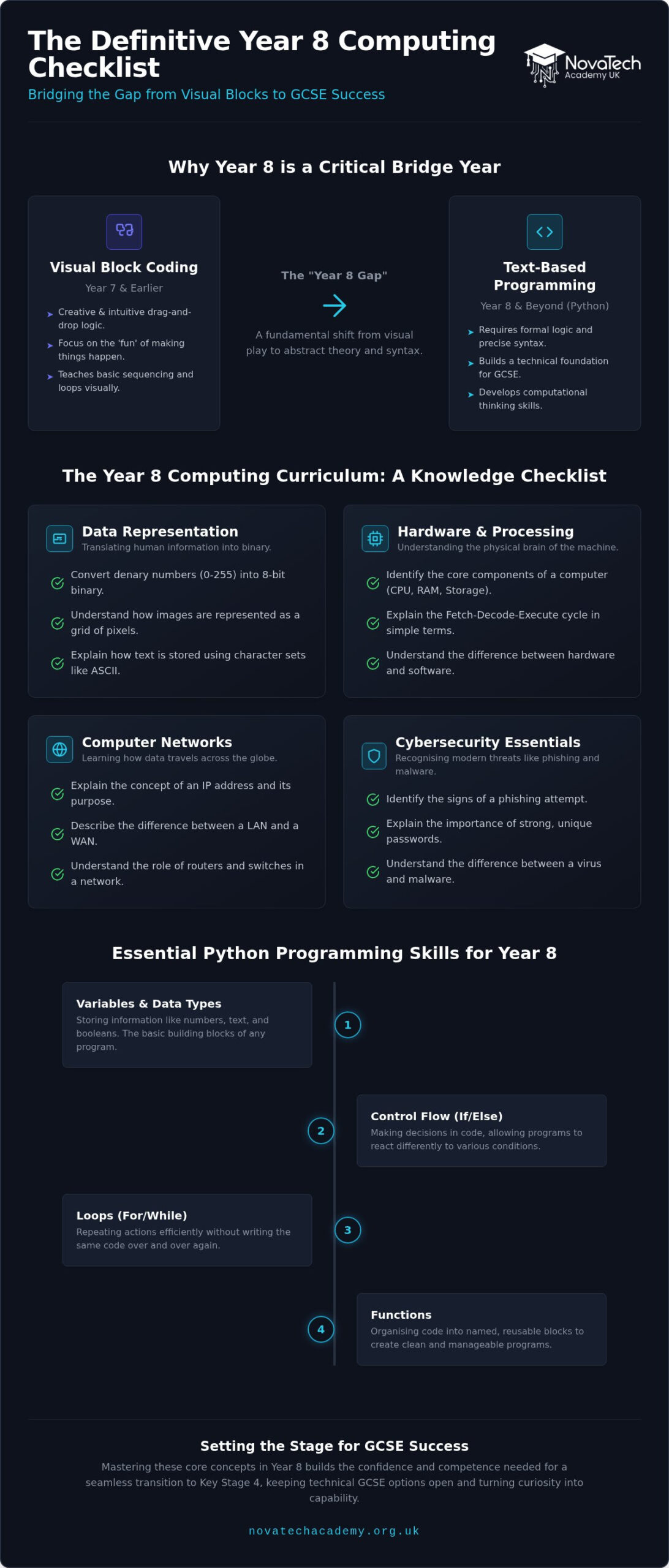
Year 8 represents a pivotal turning point in a student’s technical journey. It’s the moment where the creative play of Year 7 evolves into the rigorous foundations of formal logic. We refer to this as the “Year 8 Gap”. It marks the transition from visual, block-based environments to the abstract world of text-based programming and computational theory. For students aged 12 to 13, this shift isn’t just about learning a new language; it’s a fundamental change in how they perceive and solve problems.
The 2026 curriculum requirements have significantly increased the expectations for this age group. With the Department for Education and BCS moving towards a broader “Computing” GCSE, students are now expected to grasp concepts like AI ethics, data science, and cybersecurity earlier than ever before. Basic digital literacy is no longer enough to stay competitive. Whilst Year 7 is often about the “fun” of making things move on a screen, Year 8 is about building the technical “foundation” that supports future innovation. It’s the year where curiosity must be paired with academic rigour to ensure long-term success.
The Shift from Digital Literacy to Computer Science
There’s a distinct difference between using software and understanding the mechanics that make it function. Most students are proficient at navigating interfaces, but Year 8 demands they look under the bonnet. This is the year they begin to think like engineers rather than just consumers. They start exploring how data is represented in binary and how algorithms influence the digital world. Computational thinking is a structured problem-solving tool that helps Year 8s decompose complex tasks into logical, executable steps. This evolution is a vital part of computer science education, as it moves the learner from passive interaction to active creation.
Setting the Stage for GCSE Choices
The progress made in Year 8 directly impacts the choices students make in Year 9. If a student feels overwhelmed by the sudden jump in difficulty, they often shy away from technical GCSE subjects. Building confidence during this “bridge year” is essential for keeping their options open. When students master the basics of logic and syntax now, they approach their options with a sense of capability rather than fear. Finding the right online computer science for year 8 can provide the personalised support needed to navigate these hurdles. Parents can find more detailed advice in our guide on choosing the best KS3 computing online course. Securing these skills early ensures that the transition to Key Stage 4 is a step forward, not a struggle to catch up.
The Year 8 Computing Curriculum: A Knowledge Checklist
While Year 7 introduces the basics, Year 8 is where the “magic” of technology begins to make sense through formal logic. To excel in online computer science for year 8, students need a structured approach to the theoretical side of the subject. It isn’t just about writing code; it’s about understanding the systems that make that code possible. The curriculum now requires a deeper dive into how computers think, process, and communicate.
A comprehensive Year 8 checklist should include the following core areas:
- Data Representation: Translating human information into binary.
- Hardware and Processing: Understanding the physical brain of the machine.
- Computer Networks: Learning how data travels across the globe.
- Cybersecurity Essentials: Recognising modern threats like phishing and malware.
Understanding Data and Binary
Computers don’t perceive letters, colours, or sounds. They only see electrical signals represented as ones and zeros. Year 8 students must master this “language” to succeed at Key Stage 4. This foundation is a core part of the national curriculum for computing. Use these checklist items to track progress:
- Can the student convert denary numbers (0-255) into 8-bit binary?
- Do they understand how images are represented as a grid of pixels?
- Can they explain how text is stored using character sets like ASCII?
Data representation is the bedrock of the GCSE specification. Without a firm grasp of bits and bytes, higher-level concepts like encryption or data compression will remain confusing.
Computer Systems and Architecture
Knowing what’s inside the box is just as important as knowing how to write software. When students learn about hardware, they stop seeing the computer as a mysterious black box and start seeing it as a logical tool. This technical literacy is a major benefit of choosing high-quality online computer science for year 8. Track these milestones:
- Identifying internal components like the Motherboard, CPU, and RAM.
- Understanding the Von Neumann architecture, specifically the Fetch-Decode-Execute cycle.
- Distinguishing between volatile memory (RAM) and non-volatile storage.
Understanding hardware prevents common misconceptions in later programming units. For instance, if a student knows how RAM works, they’ll better understand variable scope and memory management when they start building complex Python applications. If your child needs a boost in these technical areas, exploring a structured KS3 Computing course can provide the clarity and personalised support they need to stay ahead.
Networks and Security
In our connected world, students must understand the protocols that govern the internet. They should be able to explain how a data packet travels from a server to their screen. Alongside this, cybersecurity is no longer optional. Year 8s need to recognise social engineering tactics and understand how malware spreads, building the digital resilience required for the 2026 landscape.
Transitioning to Python: The Programming Skills Checklist
Moving from the visual blocks of Scratch to the text-based syntax of Python is the most significant technical leap a student makes in Key Stage 3. This “Block-to-Text” hurdle is where syntax errors, such as a missing colon or an unclosed bracket, can lead to sudden frustration. It’s a shift from drag-and-drop logic to precise, written commands. However, mastering this transition is essential. Python is the preferred language for UK secondary schools because its clean syntax closely mirrors human language, making it the ideal entry point for professional-grade coding.
From Scratch to Syntax
The first step in any high-quality online computer science for year 8 programme is helping students map their existing knowledge to new formats. We break this down into three manageable steps:
- Step 1: Mapping functions. Help students see that a “repeat 10” block in Scratch is simply a
for i in range(10):loop in Python. - Step 2: Mastering interaction. Focus on the
print()andinput()functions. These allow students to create interactive programmes that respond to user data immediately. - Step 3: Troubleshooting with confidence. Teach students that a syntax error isn’t a failure; it’s a puzzle. Learning to read an error message is a vital skill for any future developer.
Building Logical Foundations
Beyond the syntax, students must understand the “holy trinity” of programming logic: Sequence, Selection, and Iteration. These concepts form the core of The Year 8 Computing Curriculum. A student should be able to explain how a programme flows from start to finish, how it makes decisions using if statements, and how it repeats tasks using while loops.
Before they even touch the keyboard, we encourage students to practice algorithmic thinking. Writing pseudocode, which are plain English instructions that mimic code, helps them plan their logic without worrying about brackets or colons. Use this checklist for simple Python programmes to measure their progress:
- Can they build a basic calculator that performs four operations?
- Can they create a multiple-choice quiz with a scoring system?
- Do they understand the difference between an integer (whole number) and a string (text)?
When students learn online computer science for year 8, they gain the flexibility to experiment with these scripts at their own pace. This builds the foundational strength needed for the transition to GCSE, where they’ll be expected to write more complex, efficient algorithms under exam conditions. It’s about moving from “playing” with code to “building” with it.
Evaluating Online Learning Platforms: A Parent’s Quality Checklist
Choosing the right platform for online computer science for year 8 is about more than just finding a list of tutorials. Many free resources provide static content, but they often lack the structure needed to keep a 12-year-old engaged. A high-quality platform should act as a modern mentor, bridging the gap between basic digital skills and the technical rigour of GCSE preparation. You aren’t just looking for a video library; you’re looking for a structured learning environment that fosters genuine growth.
Flexibility vs. Accountability
Students need the freedom to learn at their own pace, but total independence often leads to procrastination. The best online environments balance “anytime, anywhere” access with clear milestones and structured deadlines. While recorded lessons are excellent for revision and flexibility, live instruction provides the social interaction and immediate feedback that keeps motivation high. Parents should look for platforms that offer a clear reporting system. This allows you to monitor progress and celebrate achievements without needing to be a technical expert yourself.
The Value of Specialist Instruction
A general teacher might know how to use a computer, but a qualified computer science specialist understands the logic behind the screen. Specialist instruction is vital for identifying bad programming habits before they become permanent. Whether it’s improper variable naming or inefficient logic, early correction saves hours of frustration during the GCSE years. Beyond the standard school curriculum, a specialist can offer enrichment opportunities that spark long-term interest. These might include exploring data science or foundational AI concepts, which are becoming central to the 2026 educational landscape.
Before enrolling, use this quality checklist to ensure the course meets the needs of a Year 8 student:
- Logical Progression: Does the course follow a clear path through the KS3 Computing curriculum?
- Personalised Support: Are there opportunities for 1-to-1 or small group help when a student hits a coding “wall”?
- Practical Focus: Does the platform prioritise hands-on coding projects over endless theoretical slides?
- Modern Tools: Is the student using professional-grade environments like Python 3.14 rather than outdated software?
- GCSE Alignment: Is the content designed with the ultimate goal of GCSE readiness in mind?
Finding a platform that ticks all these boxes ensures your child stays ahead of the curve. If you’re looking for a structured, expert-led path that prepares students for the future, you can explore our KS3 Computing courses to see how we support student growth through personalised online learning.
Preparing for GCSE: How NovaTech Academy Supports Year 8 Learners
Many students feel a mounting sense of pressure as they approach their Year 9 subject options. NovaTech Academy removes this anxiety by treating Year 8 as a strategic launchpad rather than just another school year. Our online computer science for year 8 is built from the ground up to align with the latest 2026 curriculum review standards. This ensures every lesson contributes directly to future GCSE success. We don’t just teach students how to pass; we teach them how to excel in a digital world that’s constantly evolving.
We organise our Year 8 lessons to prioritise building genuine confidence in Python programming. We move beyond the basic syntax covered in earlier years to explore how code solves real-world problems. By the time our students reach Year 9, they aren’t just familiar with the concept of coding; they’re proficient in writing and debugging their own scripts. This mastery creates a seamless transition to the more rigorous demands of Key Stage 4.
A Modern Mentor for Digital Success
Personalised support is the cornerstone of our approach. Our qualified instructors act as modern mentors, guiding students through the complexities of data representation and hardware processing that we’ve discussed throughout this guide. We use a digital-first approach to teach complex algorithms, making abstract logic visible and manageable through interactive tools. There’s a profound sense of pride when a student successfully executes their first multi-line Python script and sees their own logic come to life on the screen. This emotional win is what turns a casual interest into a lifelong passion for technology.
Next Steps: Enrolling for Year 8 Excellence
You don’t have to wait for a new school term to give your child a technical advantage. Our admissions are open year-round, allowing students to start their Year 8 journey at the exact moment they’re ready to level up. This flexibility ensures that learning happens on their terms, without the constraints of a traditional classroom schedule. Whether they’re catching up on missed concepts or looking for enrichment beyond the standard school day, we provide the structure they need.
Building the foundations for future-ready digital skills today is the most effective way to secure academic confidence for tomorrow. Our curriculum is designed to be a bridge, turning the challenges of Year 8 into the triumphs of GCSE. If you’re ready to see your child master the logic of the future, you can Explore our Year 8 Computing online courses today and start their journey toward technical excellence.
Secure Your Child’s Digital Future Today
Year 8 is more than just a middle ground in secondary school; it’s the foundation for everything that follows in Key Stage 4. By mastering the 2026 computing standards now, your child transforms from a passive user of technology into a confident creator. We’ve explored the importance of the Year 8 Gap, the transition from blocks to Python, and the technical milestones that define GCSE readiness. Securing these skills early ensures they approach their Year 9 options with capability rather than hesitation.
Choosing high-quality online computer science for year 8 provides the expert guidance and flexible environment necessary for this transition. At NovaTech Academy, our modern, student-centric platform is led by expert tutors who specialise in the UK National Curriculum. Because our admissions are open year-round, you can start this journey whenever your child is ready to level up. Don’t let them fall behind in an increasingly digital world. Enrol your child in our KS3 Computing online course today and watch their confidence grow as they build the logic of tomorrow. The path to technical excellence starts with a single, well-placed step.
Frequently Asked Questions
Is Year 8 too early to start learning GCSE Computer Science concepts?
Year 8 is actually the perfect time to introduce foundational GCSE concepts like binary logic and algorithmic thinking. Starting early allows students to absorb abstract theories without the immediate pressure of examinations. By exploring these topics now, they build the cognitive resilience needed for the more intense Key Stage 4 curriculum. This proactive approach ensures that the jump to formal GCSE study feels like a natural progression rather than a daunting hurdle.
Does my child need a powerful computer for an online computer science course?
Your child doesn’t need a high-end gaming rig or an expensive workstation to succeed. A standard laptop or desktop computer with a reliable internet connection is perfectly adequate for running Python and accessing our learning platform. Most modern programming environments are designed to be lightweight and efficient. As long as the device can browse the web and run basic software, they’ll have everything they need to master their Year 8 technical milestones.
What is the difference between ICT and Computer Science in Year 8?
ICT typically teaches students how to use existing applications like word processors and spreadsheets for office tasks. In contrast, Computer Science explores the underlying logic, hardware, and programming that make those applications work. Choosing online computer science for year 8 ensures your child learns how to build technology through coding and system design. It’s the difference between being a consumer of digital tools and becoming a creator who understands how they function.
How much time should a Year 8 student spend on computer science each week?
We recommend that students dedicate approximately one to two hours per week to their computing studies. This balance allows them to make consistent progress through the curriculum without feeling overwhelmed by their other school subjects. Consistency is far more important than intensity at this stage. Regular, short sessions help reinforce coding syntax and logical concepts, ensuring that their new skills become a permanent part of their digital toolkit as they approach Year 9.
Can my child learn Python online if they have only ever used Scratch?
Absolutely, as Scratch provides the logical foundation that makes Python much easier to grasp. Many students find the move to text-based coding exciting because it offers more creative freedom and professional capabilities. Our online computer science for year 8 courses are specifically designed to bridge this gap. We help learners map the visual blocks they already know to Python syntax, turning their existing problem-solving skills into versatile, written programming abilities.
What happens if my child finds the Year 8 computing curriculum too difficult?
It’s completely normal for students to hit occasional coding walls when learning abstract logic. If a concept feels too challenging, we provide personalised support to help them navigate the difficulty. Our instructors break down complex algorithms into smaller, manageable tasks that build confidence slowly. We focus on the why behind the code, ensuring they understand the underlying principles before moving on to more advanced topics. This supportive approach prevents frustration and keeps learning enjoyable.
Are online computer science qualifications recognised by UK schools?
While Key Stage 3 is a preparatory phase, the skills gained through a structured online course are highly recognised by secondary schools across the UK. These courses demonstrate a student’s initiative and technical proficiency, which is particularly beneficial when they apply for competitive GCSE options. Schools value the discipline required for online learning and the advanced programming skills that often exceed the standard classroom curriculum. This preparation provides a clear advantage during internal school assessments.
How do I know if my child is ready for a GCSE computer science course?
A student is ready for GCSE when they can independently solve simple problems using Python and explain how data is stored in a computer. If they feel comfortable with the Year 8 checklist we’ve provided, they have the foundational strength required for Key Stage 4. Readiness isn’t just about technical knowledge; it’s also about having the curiosity to investigate how systems work. Consistent success in Year 8 is the clearest indicator of future GCSE achievement.