
Did you know that 83% of UK students now find online learning platforms essential for their academic success? As your child enters secondary school, the shift from simple block-coding to text-based languages can feel like a daunting hurdle. Finding high-quality online computer science for year 7 is often the best way to support them, especially if local schools lack specialist teachers or ways to keep children safe whilst they learn online. It’s a pivotal moment where students move from being passive technology consumers to becoming confident creators.
This guide helps you discover the most effective resources to give your child a distinct advantage in Key Stage 3. You’ll learn how to bridge the gap between primary school basics and the rigorous demands of the modern curriculum. We will cover everything from mastering practical coding skills to understanding the new 2026 online safety regulations. By the end of this article, you’ll have a clear strategy to build your child’s digital confidence and create a rock-solid foundation for their future GCSE success.
Key Takeaways
- Understand why Year 7 is the critical bridge between primary school block-coding and the logic-based demands of Key Stage 3 computing.
- Identify the core pillars of the UK national curriculum to ensure your child masters algorithms, data representation, and hardware.
- Learn how to select premium online computer science for year 7 by prioritising active, live instruction over passive video resources.
- Organise a professional home learning environment that supports modern software and provides a distraction-free space for practical coding.
- Discover how early engagement in secondary computing builds the digital confidence and foundational strength needed for GCSE success.
Why Year 7 is the Perfect Time to Start Online Computer Science
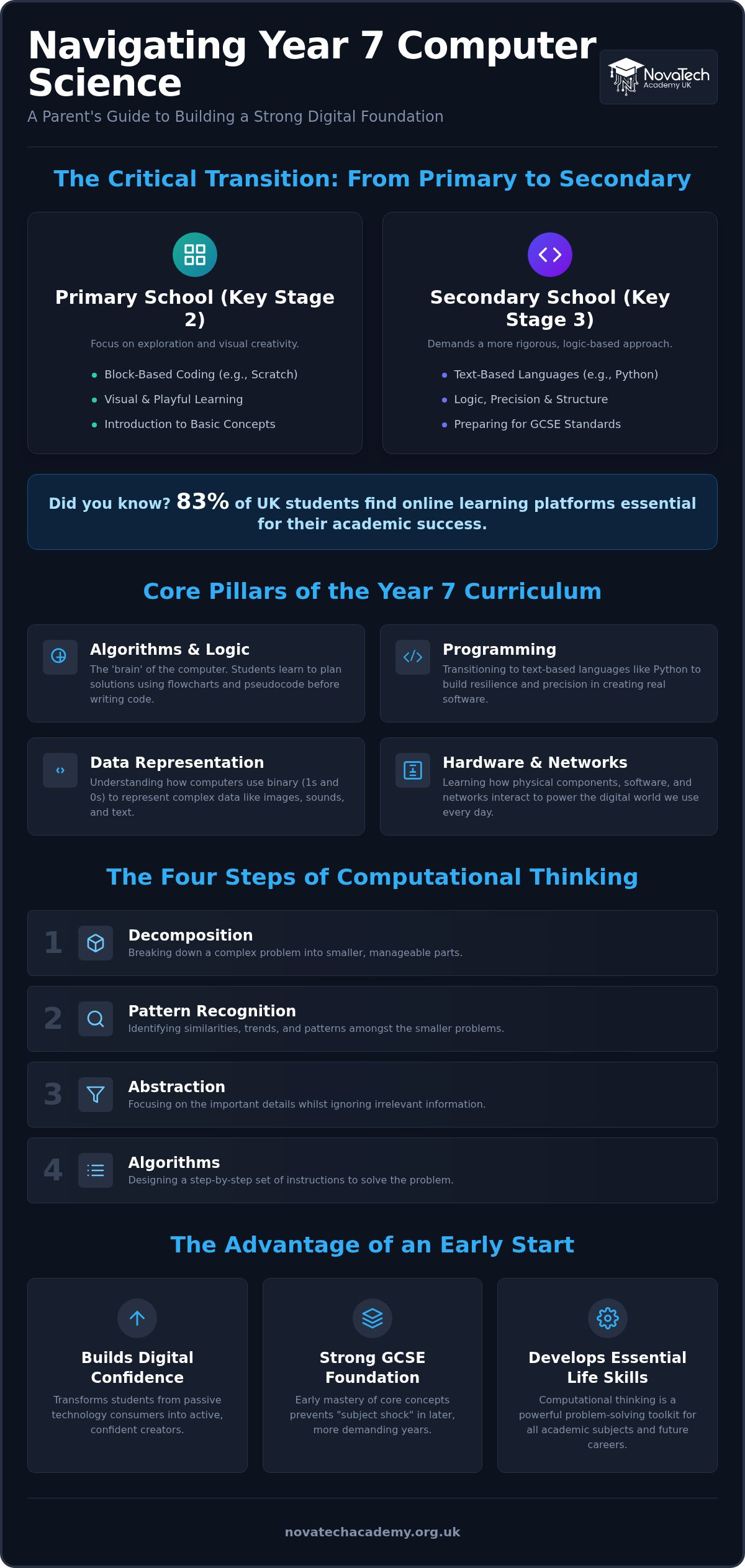
Year 7 marks a significant shift in a student’s academic journey. In primary school, Computing education often focuses on exploration and visual blocks. Secondary school demands a more rigorous, logic-based approach. This transition from Key Stage 2 to Key Stage 3 is the ideal moment to introduce online computer science for year 7. By starting early, students avoid the ‘subject shock’ that often occurs when they encounter complex theory for the first time in later years. It’s about turning the page from playing with technology to truly understanding its architecture.
The 2026 curriculum requirements are more demanding than ever before. Students are expected to understand Boolean logic and data representation from the outset. Choosing a flexible, online path allows your child to progress at their own speed, revisiting difficult concepts without the pressure of a ticking classroom clock. They can access high-quality global resources and specialised instructors that might not be available in every local school. This early mastery builds a buffer of confidence, ensuring they don’t just keep up, but actually lead the way amongst their peers. Building these skills in Year 7 also creates a strong platform for the more advanced topics covered in online computer science for year 8, where Python and computational thinking become even more demanding.
The Jump from Block-Based Coding to Real Programming
Most children enter Year 7 familiar with Scratch. Whilst block-coding is excellent for beginners, it hides the realities of syntax and structure. Year 7 is when students need to begin the transition to text-based languages like Python. They learn that a single misplaced colon can stop a program, which teaches precision and resilience. Computational thinking is the foundation of all modern problem-solving. This shift helps them see programming as a tool for creation rather than just a digital toy.
Building Digital Literacy for the Modern World
Computer science is far more than just writing code. It involves a deep dive into how hardware, software, and networks interact to power our world. By engaging with online computer science for year 7, students use the very tools that professionals use every day. This mirrors the modern tech environment, teaching them to manage digital workspaces and collaborate effectively. They gain a holistic view of technology that prepares them for both future exams and life in a digital-first economy.
What Does the Year 7 Computer Science Curriculum Cover?
The Year 7 syllabus is a structured journey designed to transform how students interact with the digital world. It moves away from the simplified tasks of primary school and introduces the rigorous standards set by the UK’s national computing curriculum. Students explore four core pillars: Algorithms, Programming, Data Representation, and Hardware. This foundation ensures they understand not just how to use a device, but how it functions at its most basic level.
At the heart of this curriculum is Computational Thinking. It’s a problem-solving methodology broken into four vital components: decomposition, pattern recognition, abstraction, and algorithms. Mastering these skills through online computer science for year 7 gives students a toolkit they can apply to any academic subject, from mathematics to the sciences. It teaches them to break complex problems into smaller, manageable parts whilst ignoring irrelevant details that cloud a solution.
Python is typically the preferred language introduced at this stage. Its clear syntax makes it accessible for beginners whilst remaining powerful enough for professional use. Alongside technical skills, students must focus on E-safety and digital citizenship. With 2026 regulations increasing the focus on online safety, learning to navigate the web responsibly is as important as learning to code. If you want your child to master these concepts in a supportive environment, consider our specialised KS3 computing courses.
Algorithms and Logic: The Brain of the Computer
Before writing any code, students learn to plan. They use flowcharts and pseudocode to map out logic before they touch a keyboard. It’s like writing a recipe before you start cooking; if the steps aren’t in the right order, the result won’t work. By practising these logic structures early, students develop the analytical mindset required for high-level engineering and software development.
Data Representation: Binary and Beyond
Computers don’t understand English; they ‘talk’ using binary. Year 7 students learn how simple 1s and 0s combine to represent complex data like high-definition images and digital sound. Understanding this relationship between hardware and data is crucial for future GCSE success. It demystifies the ‘magic’ of technology, showing students the mathematical reality behind their favourite apps and games.
How to Choose the Best Online Computer Science Course
Selecting the right provider is about more than just finding a set of video tutorials. Many parents start with passive resources like BBC Bitesize, which are excellent for quick definitions but often lack the depth needed for a true transition into secondary computing. When evaluating online computer science for year 7, look for active learning environments. Live instruction allows students to ask questions in real-time, ensuring they don’t get stuck on a single line of code for hours. It’s the difference between watching a swimming lesson and actually getting in the pool.
A high-quality course must provide a clear structure whilst remaining flexible enough for family life. You want a programme that respects your schedule but doesn’t compromise on academic rigour. Check if the provider offers year-round admissions. This flexibility is vital for students who discover a passion for technology mid-term or those who need to fill gaps in their local school’s provision. A structured path keeps them on track, but the ability to start when they’re ready makes the learning process much more manageable and less stressful for the whole family. It’s also worth thinking ahead and reviewing the essential Year 8 online computer science checklist for 2026 so you can choose a provider whose curriculum builds seamlessly into the next stage.
Checking for Curriculum Alignment
Your choice should align closely with the National Curriculum for Computing to ensure your child is ready for the eventual jump to GCSE. Look for syllabuses that explicitly cover logic gates, networking, and the fundamentals of Python. These aren’t just buzzwords; they’re the building blocks for major exam boards like AQA, OCR, and Edexcel. A well-aligned course acts as a bridge. It makes the transition to Key Stage 4 feel like a natural progression rather than a steep, intimidating climb in a few years’ time.
The Role of Personalised Feedback
Learning to code is essentially learning to ‘debug’. It’s a frustrating process when done alone, but it becomes a valuable lesson in resilience with a mentor’s guidance. Small class sizes or 1-to-1 support are essential for this. When an expert validates a student’s work or points out a logical error, it provides a massive psychological boost. This personalised feedback is what turns a confusing error message into a ‘eureka’ moment. Choosing online computer science for year 7 that includes direct tutor interaction ensures your child develops practical skills that stick. They learn to think like engineers, not just copy-pasters.
Setting Up for Success: A Parent’s Action Plan
Creating the right environment is the first step toward mastering online computer science for year 7. A dedicated, distraction-free learning space helps your child separate academic time from leisure. Ensure the internet connection is stable enough for high-definition video streaming and collaborative coding sessions. With the 2026 online safety regulations requiring stricter platform monitoring, choosing a secure home environment adds an extra layer of protection whilst they learn. It’s about setting a professional tone from the start. When your child has a consistent place to work, they’re more likely to approach their studies with the focus required for complex logic.
Hardware and Software Essentials
Most parents worry about the cost of technology, but you rarely need a high-end PC for Key Stage 3. A standard laptop with 8GB of RAM is usually sufficient for modern Integrated Development Environments (IDEs). A physical keyboard is far more important than a powerful processor, as it allows for the precise typing required for Python syntax. Tablets are often too restrictive for the text-heavy nature of secondary computing. You should install free tools like Python IDLE or Thonny to let your child practice between lessons. Good ergonomics are also essential. Ensure the screen is at eye level and the chair provides proper support to prevent the posture issues often seen in young learners.
Encouraging a Growth Mindset
Frustration is a natural part of the coding process. When code doesn’t work, it’s an opportunity for a growth mindset to flourish. Encourage your child to view debugging as a detective game. Instead of fixing the error for them, ask open-ended questions about their logic. This ownership is what transforms a student into a creator. Celebrate the moment they find a bug as much as the moment the program finally runs. It builds the mental toughness required for GCSE-level challenges. Letting them ‘tinker’ with code outside of formal lessons fosters a genuine curiosity that goes beyond the syllabus.
Shift your focus from traditional test scores to project-based milestones. Ask your child to demonstrate a script they’ve written or explain how a specific algorithm works. This practical application proves they’ve internalised the concepts rather than just memorised definitions. If you want a structured plan that handles the technical setup and provides expert guidance, enrol in our online KS3 computer science programme to get started today.
Why NovaTech Academy is the Choice for Year 7 Computing
NovaTech Academy operates as a modern mentor, providing a learning environment that feels natural to digital natives whilst maintaining traditional academic standards. We understand that Year 7 is a critical bridge. It’s the moment when students must move from being technology users to technology creators. Our approach to online computer science for year 7 replaces the rigid, one-size-fits-all model of traditional schooling with a dynamic, student-centric experience. We focus on building the foundational strength required for GCSE and A-Level success, ensuring students are never left behind as concepts grow more complex.
Expert Tutors Who Inspire
Our instructors are far more than just lecturers; they’re qualified professionals who act as dedicated mentors. In a digital-first setting, the value of personalised academic support cannot be overstated. We bridge the gap between theory and practice by providing real-time feedback on coding projects and logical exercises. This hands-on guidance ensures that students don’t just memorise definitions but actually understand how to apply them. We specialise in making complex topics like Boolean logic and data structures feel accessible and genuinely engaging for younger learners.
A Seamless Path to GCSE and Beyond
Success in computer science is built on a logical progression of skills. Our KS3 programme is specifically mapped to the requirements of major UK exam boards, providing a direct route to future qualifications. We don’t believe in the ‘wait and see’ approach of traditional terms. Our year-round admissions process means your child can start building their digital confidence the moment they’re ready. This flexibility allows families to integrate high-quality computing education into their lives without the stress of rigid schedules. You can enrol your child in our KS3 Computing course today to secure their place in our modern learning community.
Our commitment to future-readiness ensures that students develop a versatile digital toolkit. We empower them with the problem-solving abilities and technical proficiency needed for the careers of 2026 and beyond. By choosing a partner that simplifies the educational path, you’re giving your child the best possible start in Key Stage 3. We act as the bridge between current skills and future success, providing the warmth and inclusivity that helps every student reach their full potential.
Empower Your Child’s Secondary Journey
Year 7 is a pivotal transition point where curiosity meets the technical rigour of Key Stage 3. By moving beyond basic block-coding and embracing text-based programming, your child builds the mental resilience needed for long-term success. Choosing the right online computer science for year 7 ensures they receive the active mentorship and structured curriculum required to master complex logic early. It’s about more than just passing exams; it’s about fostering a lifelong confidence in the tools that shape our world.
NovaTech Academy provides the perfect environment for this growth. With our specialist KS3-A Level curriculum and expert UK-based tutors, we offer a flexible online learning platform that fits your family’s schedule whilst maintaining high academic standards. We act as a bridge between foundational digital literacy and the advanced skills required for the future. Secure your child’s place in our Year 7 Computer Science programme today. Let’s work together to turn their potential into practical expertise and give them the head start they deserve.
Frequently Asked Questions
Is Year 7 too early to start learning Python?
Year 7 is the ideal time to begin learning Python because the language uses a clear, readable syntax that mirrors English. Whilst primary school often focuses on visual blocks, secondary education requires text-based logic to solve more complex problems. Starting at age 11 or 12 allows students to build resilience through debugging before the pressure of GCSEs begins. It transforms them from technology users into creators with a versatile skill set.
What hardware does my child need for an online computer science course?
Your child doesn’t need a high-end gaming PC to succeed in online computer science for year 7. A standard laptop or desktop computer with at least 8GB of RAM and a reliable internet connection is perfectly sufficient. A physical keyboard is essential for accurate coding, so tablets are generally not recommended for these lessons. Ensure the device can run a modern web browser and simple programming environments like Thonny or Python IDLE.
How many hours a week should a Year 7 student spend on computing?
A balanced approach typically involves one to two hours of structured lessons per week, supplemented by an hour of independent practice or ‘tinkering’. This rhythm ensures they retain new concepts without feeling overwhelmed by their secondary school workload. Regular, short sessions are far more effective for learning logic than long, infrequent blocks. Consistency helps students internalise the fundamental principles of algorithms and data representation through practical application and repetition.
Can online computer science help my child with their other school subjects?
Computing develops analytical skills that directly benefit other subjects across the curriculum. The logic used in programming strengthens mathematical reasoning, whilst the process of debugging mirrors the scientific method of testing and refining hypotheses. Even English skills improve as students learn the importance of precise structure and clear communication. By studying online computer science for year 7, your child gains a problem-solving toolkit that they can apply to any academic challenge.
What is the difference between ICT and Computer Science in Year 7?
ICT focuses on digital literacy and the practical use of existing software, such as word processors or spreadsheets. In contrast, Computer Science explores the underlying principles of how these systems actually work. It covers the ‘how’ and ‘why’ behind technology, including hardware architecture, networking, and programming. Whilst ICT teaches students to be efficient office workers, Computer Science empowers them to become the engineers and developers who build the next generation of digital tools.
How do I know if my child is making progress in their online lessons?
Progress is best measured through project-based achievements rather than simple test scores alone. You’ll know your child is improving when they can explain the logic behind a script they’ve written or successfully fix a bug without immediate help. Increased digital confidence and a willingness to experiment with new ideas are also key indicators of growth. At NovaTech Academy, we provide regular feedback to ensure parents stay informed about their child’s practical development and milestones.
Are there any free resources to supplement an online course?
Several excellent free platforms can supplement a structured course. BBC Bitesize provides clear definitions that align with the UK national curriculum, whilst W3Schools offers comprehensive tutorials for Python syntax. For those who still enjoy visual logic, Scratch remains a great place to prototype ideas before translating them into text-based code. These resources are fantastic for quick reference, but they work best when paired with the accountability and expert guidance of a professional tutor.
How does NovaTech Academy support students who find coding difficult?
We provide personalised academic support to ensure no student feels left behind. Our expert tutors act as mentors, breaking down complex concepts into manageable steps that match each learner’s pace. We focus on building a supportive atmosphere where ‘broken’ code is seen as a valuable learning opportunity rather than a failure. This approach reduces frustration and helps students develop the resilience needed to bridge the gap between foundational digital literacy and advanced computer science.